



-p-500.webp)


Webflow updated its plans and pricing. Here is what that means for you.


What actually changed in Webflow's plans and pricing?
Webflow made four changes effective May 13, 2026:
- The CMS and Business Site plans are merged into one new Premium plan, priced at $25/month (annual) or $39/month (monthly). The Premium plan includes 20,000 CMS items and 40 CMS Collections, removing the need for CMS add-ons entirely.
- The Basic plan gets a price increase, from $14 to $15/month annually and from $18 to $25/month monthly. Static page limit doubles from 150 to 300.
- A new Team plan launches at $2,500/month on an annual contract. More on this below.
- AI credits are included in every Workspace plan starting today. Credit limits will not be enforced until June 29, 2026.
If you are an existing customer, nothing changes immediately. For most existing sites, changes take effect at your next renewal on or after June 29, 2026. If you are in a Freelancer or Agency Workspace, or on legacy pricing, you have until November 16, 2026. Switching to annual billing before those dates locks in your current plan for another year.
Will you pay more or less under the new Webflow pricing?
Whether you pay more or less depends on your current plan and usage. Webflow built a pricing change calculator to help you work it out.
- Former CMS plan customers get more: double static page count, higher Webflow Cloud limits, form file upload, well-known files, and faster search indexing. Most will pay the same or less.
- Former Business plan customers keep most of what they have, but included bandwidth drops from 100GB to 50GB. Bandwidth add-ons remain available. Some will pay more depending on usage.
- New site plan purchases are on the new pricing immediately.
The honest answer for most B2B SaaS teams in our customer base: if you were on the CMS plan, this is a genuine upgrade. If you were on the Business plan with high bandwidth needs, check the calculator before your renewal date.

What is Webflow Enterprise and why does it matter for B2B SaaS teams?
Webflow Enterprise is a fully custom-quoted plan built for organizations that need governance, advanced security, configurable publishing workflows, and dedicated support. It is not listed at a fixed price because it is scoped to the specific needs of each organization.
The platform has earned that positioning through consistent and substantial shipping. Over the past 18 months, Webflow has moved at a pace that would have been hard to predict two years ago. The next-gen CMS, rebuilt from the ground up and rolled out to all customers by April 2026, handles scale that simply was not possible before: deeper nesting, 10x more nested items, richer data structures designed for AI-driven discovery. Analyze and Optimize, now native to the platform, put conversion data and A/B testing directly inside the same interface where the site is built. The Claude connector, launched in February 2026, lets AI tools manage CMS content and run audits through the Webflow MCP server. And Webflow AEO, currently in private beta for Enterprise, is a closed-loop answer engine optimization system that measures, recommends, and executes changes from inside Webflow itself.
That last one matters. AEO is not a reporting tool. It is an agentic workflow that can implement schema fixes, restructure content for AI search, and ship improvements at scale. For B2B SaaS teams where organic discovery is a growth lever, this is not a nice-to-have.
For our customers at Noco, working as an embedded growth partner on PRO subscriptions with companies like Prove, Pencil, and Edge Impulse, Webflow Enterprise is the infrastructure layer that makes continuous improvement possible. Page branching means multiple work streams can run in parallel without breaking production. Single-page publishing means a fix or a new section can go live without a full-site deploy. Granular access control means the client's marketing team can edit and publish safely within guardrails their engineering team trusts. These are not features that make a website look better. They are features that make a website team operate better.
What pain points does Webflow Enterprise solve for growing B2B SaaS teams?
- Version control and publishing workflows: Page branching lets different team members work on separate pages in parallel. Branch approvals add a review layer before anything goes live. Single-page publishing means changes are scoped and controlled, not site-wide.
- Team governance and access control: Granular permissions separate who can design, who can edit content, and who can publish. This matters when multiple stakeholders, including agencies like Noco, operate inside the same workspace.
- Security and compliance: Custom SSL certificates, security headers, and enhanced compliance features are included at the Enterprise tier. For B2B SaaS companies managing sensitive customer data or operating in regulated industries, this is not optional.
- Scale and performance: The next-gen CMS handles content volume and complexity that self-serve plans were not built for. Combined with Webflow Cloud and its expanded compute limits, the platform supports sites that grow without needing re-platforming.
- AI-native workflows: The Webflow AEO agentic system, the MCP server for AI tool integration, and the Claude connector all live inside Enterprise. For teams that want to stay visible in AI-driven search, this is where the capability lives.
- Agency and partner support: For organizations working with a partner like Noco, the content management API rate limits on Enterprise and Team are significantly higher, making migrations, large-scale content updates, and programmatic workflows meaningfully faster.
What is the Webflow Team plan and who is it for?
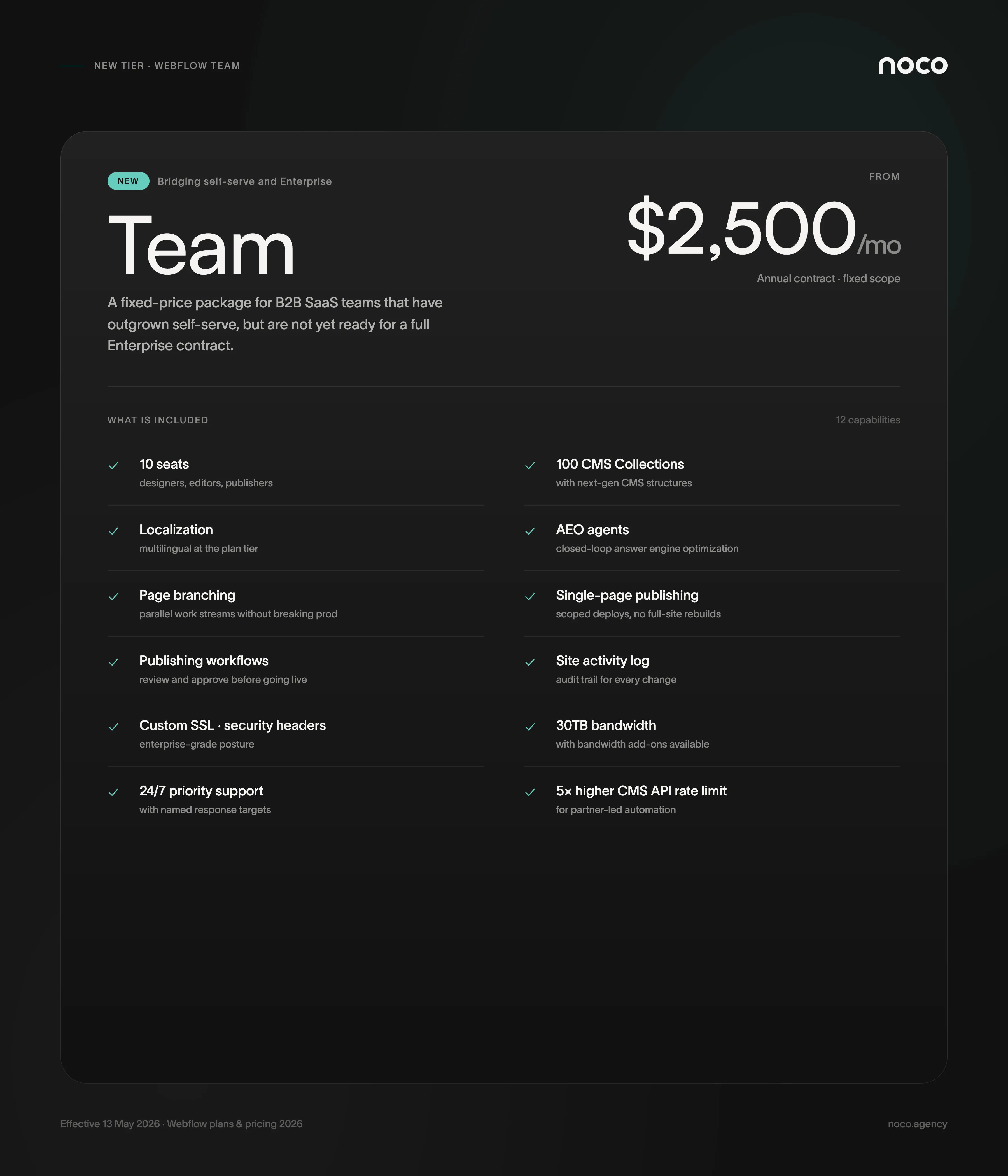
The Team plan is the most significant change in this update for growing B2B SaaS teams. At $2,500/month on an annual contract, it is a fixed-price package that bridges the gap between self-serve and full Enterprise.
For a long time, the choice between Webflow's self-serve and Enterprise tiers was binary. Either you were on a standard site plan, piecing together the right combination of add-ons, or you were in a custom Enterprise contract. There was no clear middle ground, and when clients asked what to budget for as they outgrew self-serve, there was no straight answer to give.
The Team plan closes that gap. It bundles a site with 100 CMS Collections, 10 seats, Localization, AEO agents, page branching, single-page publishing, publishing workflows, a site activity log, custom SSL certificates, security headers, and 30TB of bandwidth. It also includes 24/7 priority support and a content management API rate limit that is 5x higher than self-serve.
We have spent time working through what actually drives teams toward Enterprise, and the trigger is rarely the most sophisticated feature. For one of our long-term customers, the single thing that pushed the decision was hitting the CMS item limit on a Business plan. It was operational friction, not a strategic roadmap item. The Team plan removes most of those friction points before they become blockers, at a price that is fixed and scoped from day one.
How does the new pricing affect existing Webflow customers right now?
The rollout is phased, so existing customers have time to plan. Here is exactly when changes take effect:
- New site plan purchase: Today, May 13, 2026.
- Most existing sites: At next renewal on or after June 29, 2026. Switch to annual before that date to lock in your current plan for one more year.
- Freelancer or Agency Workspace, or legacy pricing: At next renewal on or after November 16, 2026. Switch to annual before that date to lock in for one more year.
If you are managing a site under a Noco subscription, your timeline is November 2026. You have room to plan the conversation properly.
What does this mean from where Noco stands?
We are committed to Webflow, and that commitment is grounded in where the platform is headed: continuous improvement, AI-native workflows, enterprise-grade governance, and the ability for an embedded partner like Noco to operate inside the same infrastructure and ship work without friction.
We have direct access to Webflow's account executive and solutions engineering teams. When a customer has a complex infrastructure question or a migration that needs to be done right, we have a direct line. That matters in practice. We have seen it reduce support timelines, accelerate complex builds, and surface the right solutions faster.
We are also critical when something does not serve our customers well, and Webflow knows that. We believe they listen, and recent shipping velocity suggests they act on it. The Team plan existing at all is evidence of that. It was a missing piece in the lineup, and now it is not.
Coming up, we are planning joint podcast episodes with Webflow's solutions engineering team covering specific Enterprise features in practical depth, and a webinar series focused on AEO strategy for B2B SaaS teams. If those are relevant to where your team is headed, you will want to stay close to our content.
If you are trying to work out whether the new pricing affects your current setup, or whether the Team or Enterprise plan is a conversation worth having, that is exactly what we help with. Start with our PRO subscription page or book a call and we can map it out together.




Make your next move. Today.
Momentum is created in the first conversation. When the energy matches, everything else accelerates.

.webp)

Frequently asked questions.
Are you a Webflow Premium Partner Enterprise?

Do you support AEO and AI search?
Should we choose Webflow or Framer?
What happens after launch?

Framer vs Webflow for B2B SaaS: Which Platform Fits Your Growth Stage
Most B2B SaaS teams rely on multiple external tools to track user behavior and run tests. Webflow now combines analytics and optimization directly in the platform. This changes how fast you can gather insights and act on them.